Getting Started with Energy Lens
Following are instructions for getting started with Energy Lens, after you have installed it (installation instructions are given on the download page).
Opening Energy Lens
You can open Energy Lens by double-clicking its desktop icon, or by selecting the appropriate option in the Windows "start" menu.
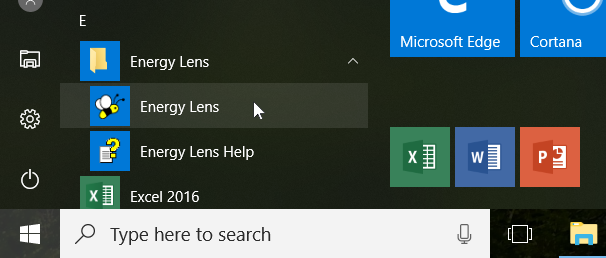
However, it's often easiest to open Energy Lens from within Microsoft Excel...
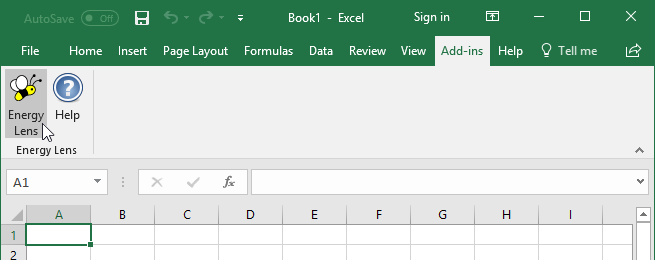
In Excel 2016, 2013, 2010 or 2007, go to the Energy Lens section of the "Add-Ins" tab, and select "Energy Lens":
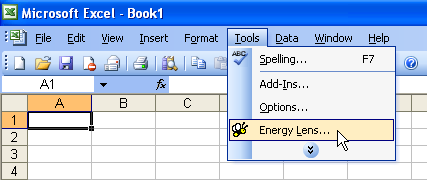
Or, in Excel 2003 or below, go to the "Tools" menu at the top of the Excel window, and select "Energy Lens...":
Not working?
If either of these options to open Energy Lens aren't available to you, there's probably a problem with the installation.
Accessing the help-files
The Energy Lens help files are accessible from the Windows "start" menu. Alternatively, you can access the help-files from within Excel...
In Excel 2016, 2013, 2010 or 2007, go to the Energy Lens section of the "Add-Ins" tab, and click "Help":
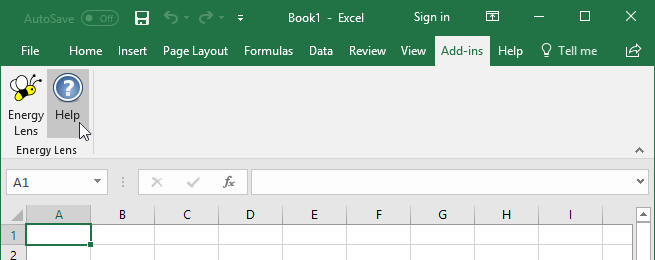
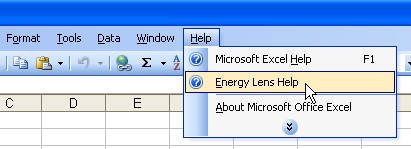
Or, in Excel 2003 or below, go to the "Help" menu at the top of the Excel window, and select "Energy Lens Help".