Interval Data – Energy Data that's Packed with Information
Interval energy data contains a lot of information about a building's energy usage. Energy Lens makes it easy to turn the raw data into useful charts and figures (you can download a free trial of Energy Lens to give it a go).
But what exactly is interval energy data, how do you get it, and why should you be interested?
Interval energy data is a fine-grained record of energy consumption, with readings made at regular intervals throughout the day, every day.
Interval energy data is collected by an interval meter, which, at the end of every interval period, records how much energy was used in the previous interval period.
Such data is often referred to as "interval data", "interval meter data", "demand interval data", "kW interval data", "electricity interval data" (electricity interval meters are particularly common), and other such variations. Common forms of interval data include 15-minute data and half-hourly data.
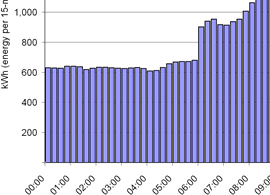
The picture below shows part of an Excel chart created by Energy Lens from 15-minute interval data. The fine-grained detail of the data is clear to see.
- Why should we be interested?
- Where does it come from, and how do you access it?
- What format does it come in?
- How often should a business monitor it?
- Why do we need Energy Lens to benefit?
Why should we be interested in interval energy data?
If you're an energy user (a business or other organization), your interval data is invaluable for the energy management that can help you to reduce your energy consumption.
If you're an energy consultant, you're probably analyzing interval data already: such analysis can very quickly reveal a lot of information about the ways in which your clients use energy.
Where does interval data come from, and how do you access it?
Interval data comes from interval meters. In the last few years it has become very common for medium- to large-sized buildings to have interval metering.
Broadly speaking, such metering systems are usually one of two types:
1. An interval meter from the energy supplier or utility
Mandatory interval metering
In many countries and states, utilities are required to supply and manage interval meters for all electricity customers over a certain size.
For example, UK energy suppliers have to provide their larger customers with half-hourly metering, as explained in the page on half-hourly data.
It is common for energy suppliers or utility companies to provide their larger customers with a free interval meter. In some countries or states this is mandatory (see right), but suppliers often do it anyway, as the detailed interval data helps them with billing and demand forecasting.
As well as using the meter data themselves, suppliers / utilities typically also make the data available to customers that request it for energy management purposes.
It's most common for utilities to provide interval electricity metering, but some utilities also provide interval metering on gas supplies. Energy Lens works with any interval energy data, whether it's from electricity or gas.
If you are the energy customer, or working on their behalf, you can contact the supplier or utility to find out how to get the interval data from them. An authorized person can usually request that the supplier email them data (e.g. for the last month or the last year), and some suppliers have a website from which customers can download their recent interval energy data.
2. A private metering system
An private metering system is often installed by the organization occupying the building, by the property managers, or by a third party that leases the system to the tenants or managers.
There are many different forms of smart-metering sytems installed in buildings, but essentially they have the following components:
- Meters – these are placed on electricity and gas supplies to monitor the energy consumed.
- Loggers or logging software – these keep a record of data from the meters, and typically offer the means to export the stored interval data in a format that Energy Lens can work with. They often offer some analysis features as well, but these are usually pretty basic.
These private metering systems are typically the best form of interval metering:
- They usually have multiple meters recording data for separate areas of the building(s). The more detailed the energy consumption data, the easier it is to identify routine waste and to track progress at reducing it.
- They will typically collect interval data for gas as well as electricity. They sometimes also meter other forms of energy such as heat.
If the building has a smart-metering system, the interval data should be readily available through that system. Once you've got the data out of the metering system you can open it up in Energy Lens to analyze it.
What format does interval meter data come in?
Interval meter data (whether 5-minute, 10-minute, 15-minute, 20-minute, 30-minute, or 60-minute) almost invariably comes in either:
- an Excel spreadsheet file; or
- a CSV file (comma separated values), which can be opened directly in Excel.
Energy Lens can work directly with either of these formats (or any other format that can be opened in Excel).
How often should a business monitor their interval energy data?
Energy Lens will allow a business to look at interval data as often as they like, but it's typically worthwhile to look at fresh data at least once a month. So, once-a-month the business would:
- Obtain the interval data for the previous month.
- Study the data to discover any energy wastage that may have occurred, and to compare the last month's energy performance with that of previous months.
- Take steps to prevent further wastage, and to further improve energy performance.
It may be beneficial to perform a similar routine more frequently, maybe once a week.
Why do we need Energy Lens to benefit?
Because Energy Lens makes it much simpler, and much less time-consuming to turn interval energy data into useful charts and figures.
Manually analyzing interval data takes time, patience, and advanced spreadsheet skills. Energy Lens makes it much easier to create charts and tables from interval data, enabling you to focus on the interpretation instead of the grunt work.
Download the free trial now to see just how easy it is to use Energy Lens.
What next?
- See how businesses with interval metering can use Energy Lens to cut energy bills.
- See how energy consultants can use Energy Lens to analyze interval data faster.
- Read about the key features of Energy Lens.
- Download the free trial of Energy Lens.
- Buy Energy Lens for permanent use of the software.